


If your answer to "what did LinkedIn contribute last quarter" requires a manual export from two platforms and a spreadsheet, the integration isn't finished.
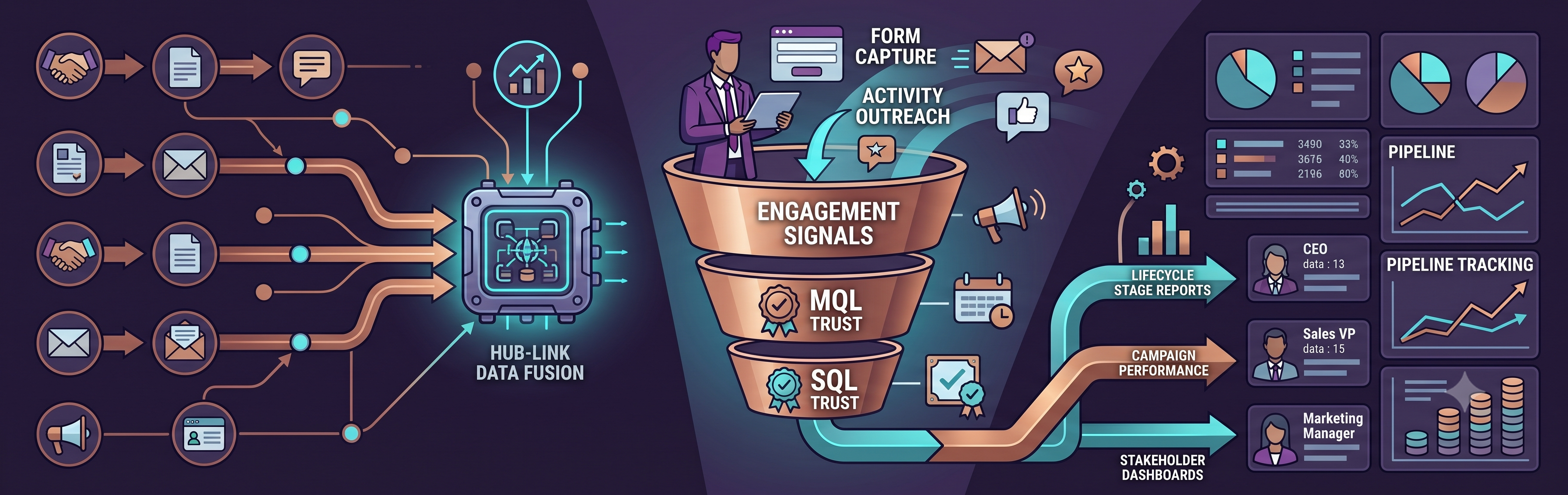
TL;DR: LinkedIn generates the leads. HubSpot is where they either become pipeline or disappear. Most integrations are set up to capture form fills and stop there — leaving outreach activity, engagement signals, and campaign attribution untracked. This article covers what LinkedIn data should flow into HubSpot, how to structure lifecycle stages and campaign tagging, how to build MQL and SQL reporting that sales will trust, and what reports each stakeholder actually needs to see.
LinkedIn attribution fails quietly. Campaigns run, form fills come in, contacts get created in HubSpot — and then nothing. No lifecycle-stage logic, no campaign-source data, no way to tell a CFO which LinkedIn activity generated the pipeline sitting in the board deck. The integration exists, the data is theoretically there, and yet the most common answer to "what did LinkedIn contribute last quarter" is a number someone pulled manually from two different platforms and hoped was right. This article shows you how to set up HubSpot so that LinkedIn-attributed pipeline is a live report you can pull in under 60 seconds — not a spreadsheet someone built the night before the board meeting.
Why Most LinkedIn-HubSpot Integrations Are Only Half Built
The default LinkedIn-HubSpot integration captures Lead Gen Form fills and syncs them as contacts. That's it. Everything else — Sales Navigator activity, organic engagement signals, ad campaign attribution at the contact level — requires deliberate configuration that most setups skip.
The result is a HubSpot instance full of LinkedIn contacts with no source data, no campaign attribution, no lifecycle stage logic, and no way to answer the question that matters: which LinkedIn activity generated pipeline?
Three specific gaps appear in almost every LinkedIn-HubSpot setup:
- Sales Navigator outreach tracked in LinkedIn, not in HubSpot contact records — no unified view of account engagement; a deal that started with an InMail has no record of it in HubSpot
- LinkedIn ad campaigns missing UTM parameters — website visits from LinkedIn ads show as direct traffic; pipeline generated from those visits gets attributed to direct, not LinkedIn
- Lead Gen Form fills creating contacts at the wrong lifecycle stage — typically "Lead" rather than "MQL" — so lead scoring workflows and SDR assignment tasks never trigger
None of these are LinkedIn problems or HubSpot problems. They're configuration problems, and each one is fixable in a single afternoon with the right setup.
See also: LinkedIn B2B Lead Generation for Israeli Tech Companies Selling Globally
What LinkedIn Data Should Flow Into HubSpot — and How?
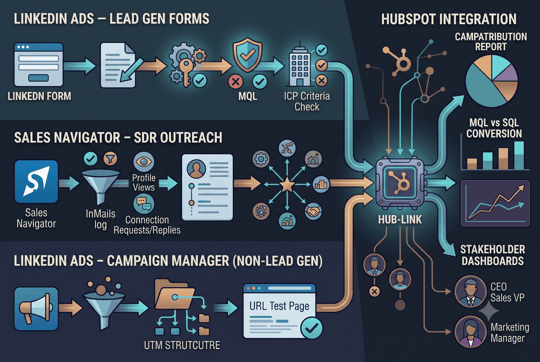
There are three distinct LinkedIn data streams, each requiring different configuration:
LinkedIn Ads — Lead Gen Forms
The native LinkedIn-HubSpot integration handles this stream. Enable it under Marketing → Ads → LinkedIn in HubSpot. Once connected, form fills create or update contacts automatically without manual import.
Required field mapping at minimum: first name, last name, company, job title, and LinkedIn campaign name. Without campaign name mapped, there's no way to attribute the contact to a specific campaign in HubSpot reports.
One critical configuration point: do not set lifecycle stage to MQL unconditionally on form fill. Build a HubSpot enrollment workflow that checks ICP fit criteria — company size, industry, job title — before advancing the contact to MQL. A raw form fill from someone outside your ICP should not trigger an SDR sequence.
Sales Navigator — SDR Outreach
Requires HubSpot Sales Hub Professional or Enterprise, plus Sales Navigator Team or Enterprise on the LinkedIn side. Once connected:
- InMails log automatically to the contact activity feed in HubSpot
- Profile views from target accounts surface in contact records
- Connection requests and replies create timeline events visible to the full revenue team
What this enables is a unified engagement view at the contact level — LinkedIn outreach alongside email opens, website visits, and call logs — so an SDR picking up a contact can see the full history without switching between platforms.
LinkedIn Ads — Campaign Manager (non-Lead Gen)
No contact-level data flows from Campaign Manager to HubSpot without UTM parameters. Every LinkedIn campaign URL needs a consistent UTM structure set before the campaign goes live:
- utm_source=linkedin
- utm_medium=paid-social
- utm_campaign=[campaign name, no spaces, lowercase]
- utm_content=[ad variant or creative identifier]
- utm_term=[audience segment]
One technical watch point: LinkedIn can strip UTM parameters from some Sponsored Content formats when the LinkedIn Insight Tag is active. Test every campaign URL in HubSpot's URL builder before launch — not after a month of unattributed traffic.
|
Is Your LinkedIn-HubSpot Integration Actually Capturing Pipeline Data? Find out which data streams are missing from your setup before the next campaign goes live.
|

How To Structure Lifecycle Stages For LinkedIn-Sourced Contacts
HubSpot's default lifecycle stages need to be configured to reflect how LinkedIn contacts actually move through the funnel. The defaults don't do this out of the box, and leaving them unconfigured means lifecycle stage data is unreliable in every downstream report.
Recommended lifecycle stage logic for LinkedIn-sourced contacts:
- Lead: any contact created from a LinkedIn source — form fill, Sales Navigator connection, ad click to website — before qualification criteria are met. This is the holding stage, not the reporting stage.
- MQL: contact reaches lead scoring threshold combining fit score and engagement score, AND source is confirmed as LinkedIn via UTM or form fill attribution. Marketing owns this number.
- SQL: sales rep manually advances the contact to SQL in HubSpot after reviewing against defined criteria — budget, authority, need, timeline. This should never be automated. It requires a human judgment call, and automating it is how unqualified contacts end up in the pipeline.
- Opportunity: deal created in HubSpot and associated to the contact. Opportunity stage should reflect the actual sales stage — not just "in progress" — so pipeline velocity is measurable.
Two workflow automation requirements that make this function without manual intervention:
- When a Lead Gen Form fill creates a contact, trigger the lead scoring workflow immediately — don't queue it for a batch process that runs overnight
- When a contact reaches MQL threshold, create a task for the assigned SDR with a 24-hour due date — not an email notification that gets buried
See also: What Is a Qualified LinkedIn Lead? MQLs, SQLs, and Pipeline Explained
How to Tag Campaigns, Forms, and Outreach Sources Correctly
Attribution breaks down at the tagging stage more often than anywhere else. Inconsistent UTM naming, untagged campaigns, and form fills with no source data make it impossible to answer which LinkedIn activity generated pipeline — even when the integration is working correctly.
UTM naming convention to enforce across every LinkedIn campaign:
| Parameter | Value | Example |
| utm_source | ||
| utm_medium | paid-social (ads) or social (organic) | paid-social |
| utm_campaign | campaign name, no spaces, lowercase | israeli-saas-cmo-q3 |
| utm_content | ad variant or creative identifier | thought-leader-v1 |
| utm_term | audience segment | vp-marketing-us |
Lead Gen Form naming convention in HubSpot: [LinkedIn] [Campaign Name] [Date] — for example, "[LinkedIn] Israeli SaaS CMO Q3 2025." This makes filtering by source instant in contact and deal reports without needing to build complex filters.
For Sales Navigator outreach: when an SDR manually creates a contact or deal sourced from Sales Navigator, the original source must be set to "LinkedIn Sales Navigator" in HubSpot at the point of creation. Left blank, HubSpot defaults to "offline" or "unknown" and that deal disappears from LinkedIn attribution reports permanently.
|
Are Your LinkedIn Campaigns Tagged Correctly in HubSpot? A single missing UTM parameter means six months of unattributable pipeline. Find out if your tagging setup is airtight.
|
How to Build MQL and SQL Reporting That Sales Will Trust
The reason sales doesn't trust marketing's pipeline reports is almost always data quality — contacts at the wrong lifecycle stage, deals with no source attribution, and MQL counts that include form fills that were never qualified. Fixing the data quality issues above is what makes these reports credible.
Four HubSpot reports every LinkedIn program needs:
- LinkedIn MQL report: contacts with lifecycle stage = MQL, original source = LinkedIn (or UTM source = linkedin), created in the reporting period, filtered by ICP fit score above threshold. This is the number marketing owns and defends in pipeline reviews.
- LinkedIn MQL-to-SQL conversion report: of MQLs created in period X, how many advanced to SQL within 30 days. Build this as a funnel report in HubSpot. This is the metric that tells you whether the qualification framework is working — not whether LinkedIn is generating volume.
- LinkedIn pipeline report: deals with associated contact original source = LinkedIn, grouped by deal stage and owner. Total pipeline value attributed to LinkedIn by campaign. This is what belongs in the board review.
- LinkedIn campaign attribution report: deals closed or in active pipeline, broken down by utm_campaign. This tells you which specific LinkedIn campaign generated revenue — not just leads. Requires UTM data to be clean and consistent from day one.
One report to avoid: MQL volume by month in isolation. Without the SQL conversion rate alongside it, the number is actively misleading in a pipeline review and gives sales ammunition to question the entire program.
See also: LinkedIn Ads vs. Sales Navigator vs. Organic LinkedIn: Which Works Best for B2B Lead Generation?
The Attribution Mistakes That Make LinkedIn Look Like It Doesn't Work
These are the five most common LinkedIn attribution errors, in order of how much pipeline they cause to go unattributed:
No UTM parameters on ad campaigns.
Website visits from LinkedIn ads show as direct traffic in HubSpot. Pipeline generated from those visits is attributed to direct, not LinkedIn. LinkedIn looks underperforming because the data simply isn't there.
Lead Gen Forms not mapped to HubSpot lifecycle stages.
Form fills create contacts at Lead stage with no scoring trigger. Contacts sit unworked until someone manually reviews them. By then the intent signal has gone cold and the conversion window has closed.
Sales Navigator activity not logged to HubSpot.
Outreach that generates a reply and eventually a meeting has no record in HubSpot. The deal that results gets attributed to "unknown" or the first tracked touchpoint — not the LinkedIn outreach that started it.
Last-touch attribution on long sales cycles.
LinkedIn typically influences pipeline early — a content engagement or form fill weeks before a demo request. Last-touch attribution gives credit to the demo request form and LinkedIn gets none. Use multi-touch attribution models in HubSpot for any deal with a sales cycle longer than 30 days.
Contacts created with wrong original source.
If a Sales Navigator contact is manually created in HubSpot without setting original source, HubSpot defaults to "offline" or "unknown." Fix requires making original source a mandatory field on manual contact creation — enforced at the process level, not left to SDR discretion.
See also: How Israeli SaaS Companies Can Use LinkedIn to Reach US and EU Buyers
What Reports Each Stakeholder Needs — and How Often
The same LinkedIn pipeline data serves different purposes for different stakeholders. One report sent to everyone is why attribution data gets ignored.
CMO — monthly:
- LinkedIn pipeline created vs. target — total value of opportunities attributed to LinkedIn in the period
- MQL-to-SQL conversion rate by campaign — which campaigns are generating qualified leads vs. volume
- Cost per SQL by campaign — not CPL; cost per SQL accounts for lead quality and makes LinkedIn's efficiency advantage visible against other channels
- LinkedIn share of total marketing-sourced pipeline — is LinkedIn growing or shrinking as a pipeline contributor quarter on quarter?
VP Sales — weekly:
- LinkedIn MQLs assigned to each SDR this week, with ICP fit score and primary engagement signal
- SQL conversion rate by SDR on LinkedIn-sourced leads — identifies where the qualification framework is being applied inconsistently across the team
- Open deals with LinkedIn as original source, by stage — which LinkedIn-sourced opportunities are advancing and which are stalling, and why
CEO / Board — quarterly:
- LinkedIn pipeline created vs. closed-won revenue attributed to LinkedIn — the full ROI picture in one number
- Cost per SQL and cost per closed deal, trended over four quarters — shows whether the program is becoming more or less efficient as it scales
- LinkedIn contribution to total pipeline as a percentage — the context needed for budget allocation decisions in the next quarter
If You Can't Answer "What Did LinkedIn Generate Last Quarter," This Is Why
The reason LinkedIn attribution fails isn't the platform — it's the sequence. UTM parameters get added after campaigns have already run. Lifecycle stages get configured after contacts have already been created at the wrong stage. Original source fields get left blank because no one made them mandatory. Six months later, someone tries to reconstruct what LinkedIn contributed from incomplete data and produces a number that satisfies nobody.
The fix isn't complicated. Set the UTM structure before the first campaign goes live. Configure lifecycle stage workflows before the first form fill comes in. Make original source mandatory before the first Sales Navigator contact gets created in HubSpot. Get those three things right and LinkedIn-attributed pipeline becomes a number you can pull in under 60 seconds — from a live HubSpot report, not a manual export.
Key Takeaways
- The default LinkedIn-HubSpot integration captures form fills and nothing else. Sales Navigator activity, campaign attribution, and engagement signals all require deliberate configuration — without it, LinkedIn-generated pipeline gets attributed to direct or unknown.
- UTM parameters set after launch are worthless. Every LinkedIn campaign needs a consistent UTM structure before the first click. That data can't be reconstructed retroactively.
- SQL advancement should never be automated. Form fills can trigger MQL workflows. Moving a contact to SQL requires a human reviewing budget, authority, need, and timeline — automate it and unqualified contacts distort every conversion metric downstream.
- One LinkedIn report sent to three stakeholders gets ignored by all three. The CMO needs cost per SQL by campaign. The VP Sales needs MQL-to-SQL rate by SDR. The CEO needs LinkedIn's share of closed-won revenue.
|
Is Your LinkedIn Activity Showing Up in HubSpot the Way It Should? We audit your LinkedIn-HubSpot integration, UTM structure, lifecycle stage logic, and pipeline attribution setup — and return a prioritized fix list within five business days. The goal: a LinkedIn-attributed pipeline report you can pull in under 60 seconds without touching a spreadsheet.
|